

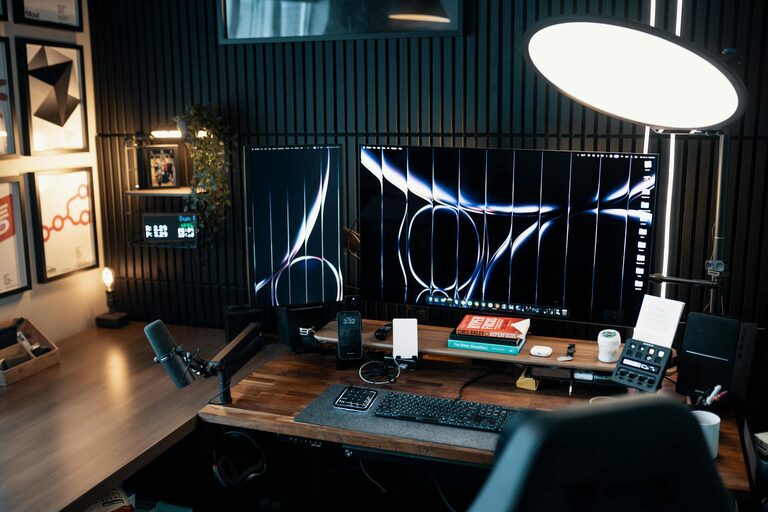
Creating a home office space that feels both comfortable and productive is essential for anyone working remotely or needing a dedicated workspace at home. A well-designed home office helps reduce distractions, improve focus, and maintain a healthy work-life balance. This guide offers practical tips to help you set up a space that supports your work habits and enhances your efficiency.
Choose the Right Location
Selecting an appropriate spot in your home is the first step. Ideally, your home office should be:
– Quiet and low-traffic: Choose an area away from busy parts of your home to minimize noise and interruptions.
– Well-lit: Natural light is best, so pick a room with windows or position your desk near a window. If natural light is limited, invest in good quality artificial lighting.
– Adequately sized: Ensure there’s enough room for your desk, chair, and essential equipment without feeling cramped.
Invest in Ergonomic Furniture
Comfort plays a significant role in productivity, so consider ergonomics when choosing your furniture:
– Ergonomic chair: A chair with adjustable height, lumbar support, and comfortable cushioning reduces strain on your back and neck.
– Appropriate desk height: Your desk should allow you to work with your elbows at about a 90-degree angle, preventing wrist and shoulder tension.
– Keyboard and mouse placement: Position them so your hands are straight and your wrists aren’t bent while typing or using the mouse.
Organize Your Workspace
A clean and tidy workspace can help keep your mind clear and focused. Try these organization tips:
– Declutter regularly: Remove unnecessary items to maintain a neat area.
– Use storage solutions: Shelves, drawers, and filing cabinets can help keep documents and supplies organized.
– Cable management: Use clips, sleeves, or ties to keep cords out of the way and prevent tangling.
Prioritize Good Lighting
Proper lighting reduces eye strain and enhances your mood:
– Natural light: Whenever possible, position your desk to face or be beside windows to maximize daylight.
– Task lighting: Add a desk lamp for focused lighting during late hours or on overcast days.
– Ambient lighting: Soften overall room lighting with curtains, indirect sources, or lamps to avoid harsh shadows or glare.
Personalize, But Keep It Professional
Adding personal touches makes your workspace inviting but balance this with professionalism:
– Decor: Incorporate plants, artwork, or inspirational items that motivate you.
– Color scheme: Use calming colors like blues, greens, or neutral shades to create a peaceful atmosphere.
– Avoid distractions: Limit personal devices like TVs or gaming consoles that could pull your focus.
Create a Routine
A home office is only as productive as your habits:
– Set working hours: Define clear start and end times to maintain work-life balance.
– Take breaks: Use short breaks to stretch, move around, or rest your eyes.
– Keep work separate: Close your office door or put away work materials after hours to mentally switch off.
Incorporate Technology Wisely
Make sure your technology supports your workflow:
– Reliable internet: Invest in a good internet connection to avoid disruptions.
– Necessary devices: Have the right computer, printer, and accessories suited to your work.
– Backup tools: Keep external drives or cloud storage for important file security.
Maintain Comfort and Wellness
Your wellbeing impacts your productivity:
– Temperature control: Keep your office at a comfortable temperature to avoid distractions.
– Air quality: Ventilate the room and consider air purifiers to maintain freshness.
– Hydration and nutrition: Keep water and healthy snacks accessible.
Final Thoughts
With the right setup and habits, your home office can become a space where you feel motivated, comfortable, and efficient. Remember that creating a productive workspace is a process – personalize your area gradually until it meets your needs best. Regularly reassess and adjust your environment to keep your work experience positive and sustainable.